Wearables
Walkthroughs and answers for wearables in TeamBuildr, filed under Integrations.
Walkthrough
FreeCan I Still Use the Wearables Integration Without Having a Wearable?
If you do not have a wearable device, we do not suggest using the integration. Your phone can keep track of sleep, steps, and possibly other metrics, but you would not receive a score without any Heart Rate data. Curr…
Walkthrough
FreeCan I Wear My Wearable for a Workout Only?
Yes! You can wear your device for the workout only. This may however produce a high score for the first 7 days of wear. This is due to the fact that the equation is set up to encompass the entire day. The reasoning be…
Walkthrough
FreeDetailed Calculation of the Exertion Score
Average Heart Rate - Average heart rate is calculated by creating HR readings over the number of seconds that the watch captures that HR for. It is then summed together and divided by the total number of minutes to ca…
Walkthrough
FreeDo I Need to Manually Log Activity?
In order to obtain a score for the day, all you need to do is log into the TeamBuildr application and possibly open your device's app to sync data from your device to Apple Health - which will automatically sync to Te…
Walkthrough
FreeGuide to Apple Watch Integration
Device HR HRV Passive Calories (BMR) Active Calories Steps Sleep Apple Watch ✅ ✅ ✅ ✅ ✅ ✅ How to add data to the Health app The Health app automatically counts your steps, walking, and running distances. And, if you ha…
Walkthrough
FreeGuide to Garmin Integration
Device HR HRV Passive Calories (BMR) Active Calories Steps Sleep Garmin ✅ ⛔️ ✅ ✅ ✅ ✅ ⚠️ = Data can be received from device, but with limitations (described below) Connecting Your Garmin Device to Apple Health Whicheve…
Walkthrough
FreeGuide to Polar Integration
Device HR HRV Passive Calories (BMR) Active Calories Steps Sleep Polar ⚠️ ⛔️ ✅ ✅ ✅ ✅ ⚠️ = Data can be received from device, but with limitations (described below) Connecting Your Polar Device to Apple Health Whichever…
Walkthrough
FreeHow are Naps Scored?
Every minute of sleep will be added to the day's recovery score after 11:59am. This will account for any time spent in bed for a prolonged period of time from the previous night. Naps will be treated as sleep.
Walkthrough
FreeHow Can I Ensure That I Get Most Accurate Exertion and Recovery Scores?
Note : Our scores can take data from multiple devices and sources in order to create the most accurate, as long as those devices and sources connect to Apple Health. Make sure you are wearing your device in the right …
Walkthrough
FreeHow to Sync Your Score
If you wear an Apple Watch, data will sync automatically when you open the TeamBuildr Training app. If you use another device, you may need to open that device’s app (eg: Garmin Connect, Polar Flow, etc.) in order for…
Walkthrough
FreeGuide to Oura Ring Integration
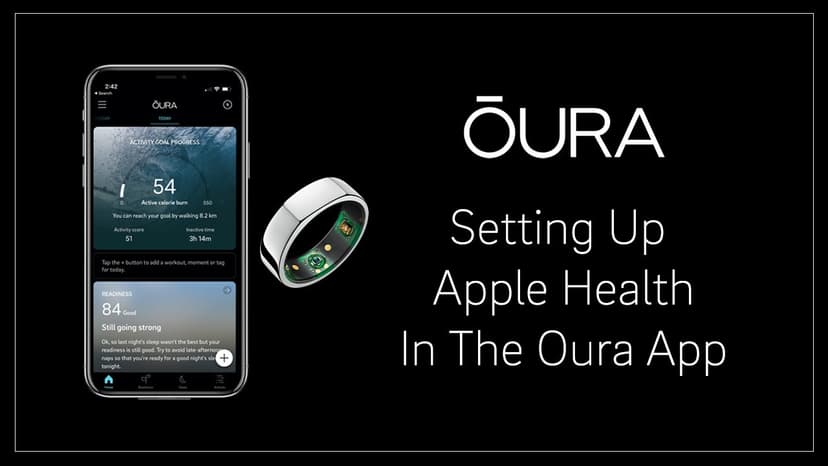
Device HR HRV Passive Calories (BMR) Active Calories Steps Sleep Oura ✅ ⛔️ ⛔️ ✅ ⛔️ ✅ ⚠️ = Data can be received from device, but with limitations (described below) Keep in mind, the Oura App might not import data from …
Walkthrough
FreeWhat Data Do We Collect and Why?
Heart Rate - This is used for the exertion score. The frequency that this is recorded depends on the device. In most cases, device reading rate will increase as your heart rate increases. Heart Rate Variability - This…
Walkthrough
Free(iPhone) What Devices are Compatible with Wearables on TeamBuildr Training iOS App?
Wearables Device Compatibility with iOS (Apple iPhone) TeamBuildr Training App The below table describes device compatibility if you own an Apple iPhone. Device HR HRV Passive Calories (BMR) Active Calories Steps Slee…
Walkthrough
FreeWhat Happens If I Do Not Wear My Device for a Few Days?
We will compare against your most previous results, but understand that this will be a less effective means of scoring since it will not have accounted for any activities or lack there of over the course of the time y…
Walkthrough
FreeWhat is a Normal/Good/Bad HRV?
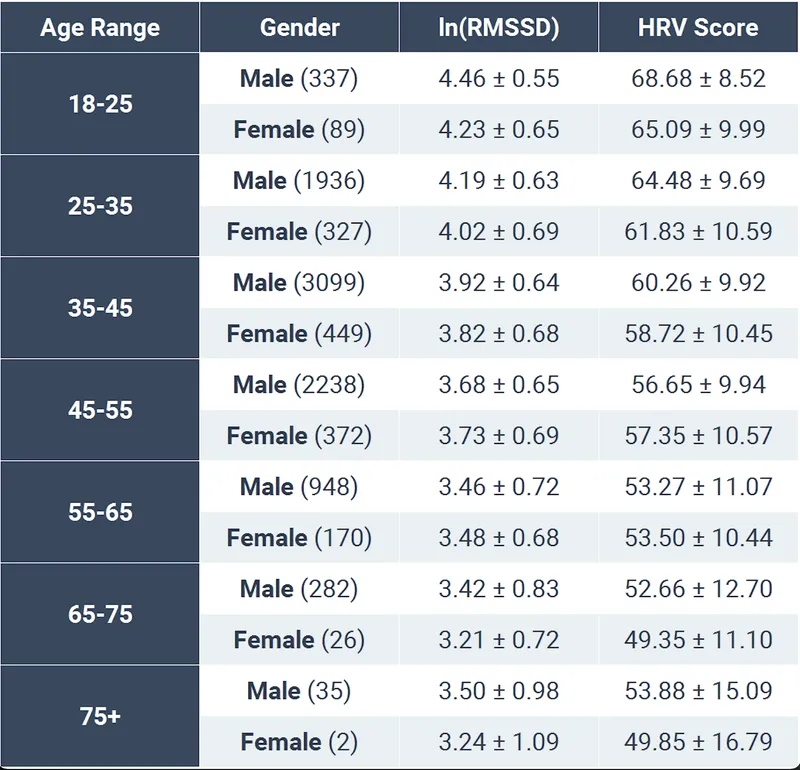
HRV is a measure of beat to beat variation in your heart rate. In a broad sense, it can be a way to measure the stress that your body has endured from a day and how your body is responding to that stress. The best tim…
Walkthrough
FreeWhat is Apple Health?
Apple Health is iPhone app for collecting data from a variety of sources and devices. Think of them as iPhone's "collection hub" for wearable and activity data. For TeamBuildr, this allows us to bypass integrating dir…
Walkthrough
FreeWhat Is Best Practice for Tracking Sleep?
Wearing your device while sleeping may not be feasible due to charging through the night. If you own an Apple iPhone, we suggest the free Pillow sleep app to track your sleep if you are not wearing your device to bed.…
Walkthrough
FreeWhat is the 7-Day Calibration Period?
During the first 7 days of use, you may find that you are getting an “Adjusted Score”, this is a time where we are trying to personalize your score to you. The first week will be about data collection and your “Adjust…