Documents and Links Assigment
A short video walkthrough of documents and Links Assigment from the TeamBuildr knowledge base.
Watch or read
8 minutes across 4 chapters. Click any chapter or timestamp to jump straight there.
4 chapters
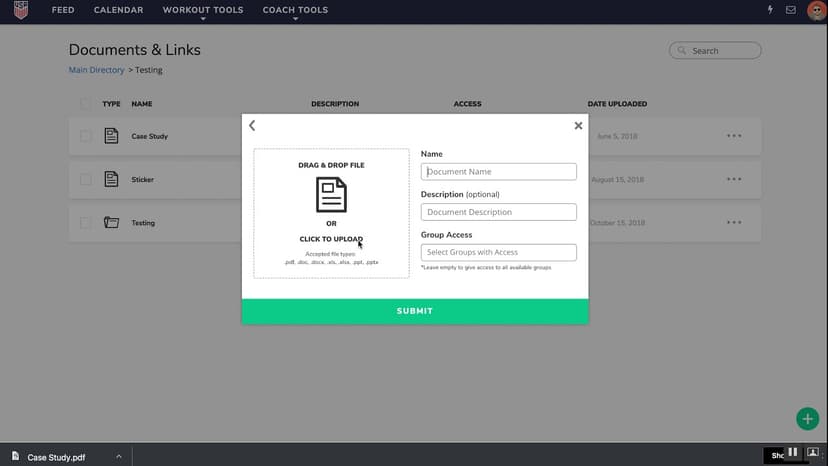
In this video, we will walk through the individual assignment of documents and links within team builder. As of January, there's an updated functionality where you can assign an individual athlete to a document folder or link within our documents and links page. You can get there by going to coach tools and then navigating down to documents and links. You'll see here I have some already made up in this demo account. Right now the access for this folder is everyone. The access for this individual link is just for football. This one is for women's
soccer. If we wanted to add an individual to the access of that link, we can click the three dots to the right, hit update, and you'll now have access to this individual dropdown. This will populate with everyone in your account that you have visibility settings for. So if you are the admin on the account, you will get everyone including the other coaches on this account. You can assign document access to those coaches specifically. You can also assign them to individuals on the
account as well. If you already have group access turned on for a particular group, their names will be highlighted and checked off to denote that their access is going to be coming through the group access area. Since Jess is on the women's soccer team and not a part of football, she does not have a check mark. I can hit her name and she will populate an individual access. And when I click update link, it will then appear that she now has access. Removing access is just as easy as clicking the X,
hitting update link, and then adding a files, folder, or links can be done through the plus button to the right. So, in adding a folder, let's say we'll do demo folder 2. You can add a description if you'd like. You can optionally add group access or optionally add individual access. Leaving those blank will make this available to everyone on the account. So when all the athletes any of the athletes in your account log into their team builder on their phone, they'll be able to access this particular folder uh
Still stuck? Contact support →
Read next
More in Documents
Walkthrough
FreeUploading Documents and Links
A short video walkthrough of uploading Documents and Links from the TeamBuildr knowledge base.
Also in Platform & Admin

Walkthrough
FreeAi Uploader
Bring in a program you already have in a spreadsheet instead of rebuilding it by hand. The AI Uploader reads one tab at a time, detects weeks and days, and matches exercises to your database. It imports your template; it does not write one.

Walkthrough
FreeAthlete Video Upload for iOS and Android
How athletes record and upload lift video from the app, and where it lands for you to review. Useful for remote athletes or anyone coaching technique between sessions.

Spreadsheet · 2 walkthroughs
Free · sign upAdvanced Attendance Report
Attendance tracking for PE and weights classes that goes past a headcount. Copy the template and it totals participation per student over any window, ready to drop into a grade or a report to an administrator.

Spreadsheet · 2 walkthroughs
Free · sign upAthlete Wellness & Body Report
Track daily wellness check-ins and body composition in one sheet. Copy the template and follow the walkthrough to connect your athlete responses, then use the report to spot who is trending the wrong way before it costs you a session.

Spreadsheet · 7 walkthroughs
Free · sign upCustom Grading System
A ready-made grading spreadsheet for PE and weights classes. Copy the template, connect it to your TeamBuildr data, and it calculates an overall grade from attendance, workout completion and evaluations. Seven short videos walk you through every step of the setup.
- Format
- Walkthrough
- Brand

- Category
- Documents
- Topics
- Platform & Admin