Overview of TeamBuildr OS Hub within TeamBuildr Strength
A short video walkthrough of overview of TeamBuildr OS Hub within TeamBuildr Strength from the TeamBuildr knowledge base.
Watch or read
2 minutes across 3 chapters. Click any chapter or timestamp to jump straight there.
3 chapters
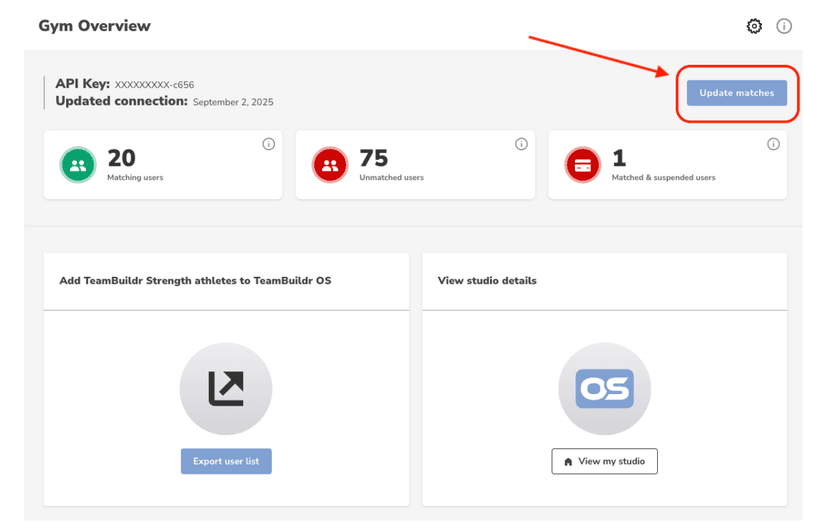
In this video, we're going to go over the TeamBuilder OS hub that you can find within your TeamBuilder Strength account. When you are connected, you will see this homepage as your gym overview. This will show you the matching users that you have, the unmatched users, and the matched and suspended users within your account. Matching users tells you how many users are matched between your TeamBuilder Strength account and your TeamBuilder OS account. These matches are based on emails across the two platforms. Unmatched users shows you how many profiles across the two platforms that are unmatched. This is not necessarily a bad thing.
Still stuck? Contact support →
Read next
More in TeamBuildr OS Integration
Walkthrough
FreeHow to Connect TeamBuildr OS to TeamBuildr Strength Account
A short video walkthrough of how to Connect TeamBuildr OS to TeamBuildr Strength Account from the TeamBuildr knowledge base.
Also in Platform & Admin
Walkthrough
FreeTeamBuildr Strength and TeamBuildr OS Integration FAQ Article
Check out some common FAQs regarding the new TeamBuildr Strength and TeamBuildr OS Integration. Q: What app will my members use to book classes? A: If you use both TeamBuildr Strength and TeamBuildr OS and have matche…
Walkthrough
FreeTeamBuildr OS Mobile App Integration
A short video walkthrough of teamBuildr OS Mobile App Integration from the TeamBuildr knowledge base.

Read on the blog · 3 min
Free3 Reasons Why Nike’s Group Fitness Studios Will Be Successfulopens blog.teambuildr.com in a new tab
The next generation of group fitness is here. Nike Studios is set to launch later this year and here are 3 reasons they will be successful.
Video · 3 min
FreeAssign Categories to Memberships
Assign Categories to Memberships — from the TeamBuildr YouTube channel.

Read on the blog · 5 min
FreeBeyond Supersets and Periodization: 6 Educational Resources for Gym Ownersopens blog.teambuildr.com in a new tab
Get our list of six educational resources designed to empower gym owners with knowledge, insights, and strategies for running a successful fitness business.
- Format
- Walkthrough
- Brand

- Category
- TeamBuildr OS Integration
- Topics
- Platform & Admin