How to Manage Tags
A "tag" allows you to label a group of lifts together - for many applications. For example, you can group Power Clean and Hang Clean under the "Cleans" tag. Here is our video on how to use Tags in your TeamBuildr acco…
A "tag" allows you to label a group of lifts together - for many applications. For example, you can group Power Clean and Hang Clean under the "Cleans" tag.
Here is our video on how to use Tags in your TeamBuildr account.
Watch or read
3 minutes across 3 chapters. Click any chapter or timestamp to jump straight there.
3 chapters
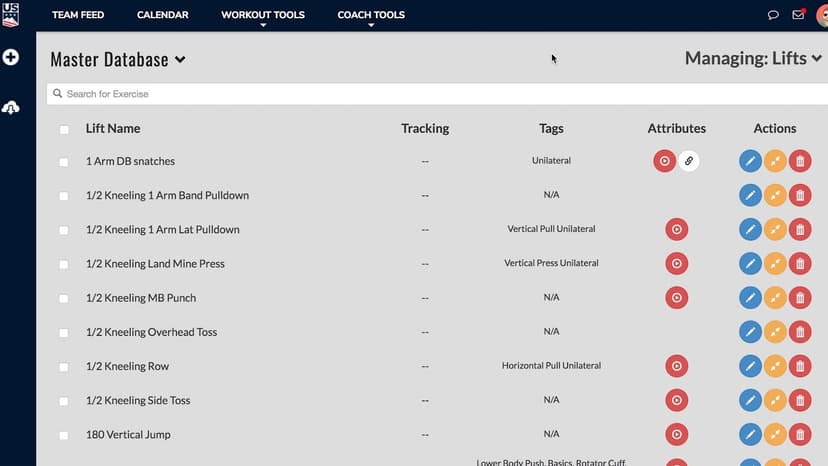
Alright, so in this video we're going to talk about how to manage tags. And tags specifically refer to how we categorize or lift exercises. So in the second video I'll show you how to use tags. There are a lot of applications for tags in Team Builder. So in this one we're just going to talk about how to even manage them in tag exercises. So in the exercise database you can see you have a tags column. And for any exercise you can edit it and you can add tags.
So for this exercise for instance I might tag it as vertical pull unilateral. Or to keep it simple you can just create a tag by typing it in and say this tag is called unilateral. Alright, and then if I create this tag I can just hit add. And if I want to add another one upper body this one already exists so I can just click upper body. You can tag an exercise as many times as you would like. Alright, so if I hit submit now I have an exercise tagged as unilateral and as upper body.
Still stuck? Contact support →
Read next
Also in Platform & Admin
Walkthrough
FreeTraining Multiple Organizations with Account Switching
Training multiple organizations with TeamBuildr can be done with "Account Switching." Account Switching allows an coach to seamlessly manage multiple accounts. An example might be a training facility franchise or ente…

Walkthrough
FreeHow to Filter Lifts When Programming With Tags (New Build)
A short video walkthrough of how to Filter Lifts When Programming With Tags (New Build) from the TeamBuildr knowledge base.
More in Exercise Database

Walkthrough
FreeUltimate Guide to Using Tags
A short video walkthrough of ultimate Guide to Using Tags from the TeamBuildr knowledge base.

Video · 2 min
FreeHow to Manage a Client in Online Payments Portal
This is includes how to change a client's program, assign a new group, change credit card information and cancel a customer's subscription.
Video · 3 min
FreeCASE STUDY: Brush High School Using TeamBuildr for Video Analysis
This spring Ryan Dugan (Strength Coach @Brush High School) noticed that most of his student-athlete’s Power Clean form was not where he wanted it to be after using multiple different teaching methods. Coach Dugan wondered if he should incorporate video analysis.

Video · 10 min
FreeDelivering Pizzas, Dropping Gems: How Gym Sessions Was Born | Built Different Ep. 7
In Episode 7 of the TeamBuildr Built Different Docuseries, we sit down with Justin Ochoa, basketball development coach and founder of Gym Sessions in Indianapolis — a company built on the belief that skill development and strength and conditioning belong together under one roof.
- Format
- Walkthrough
- Brand

- Category
- Exercise Database
- Topics
- Platform & Admin