How To Add Notes and Warm Ups (New Build)
A short video walkthrough of how To Add Notes and Warm Ups (New Build) from the TeamBuildr knowledge base.
Watch or read
3 minutes across 3 chapters. Click any chapter or timestamp to jump straight there.
3 chapters
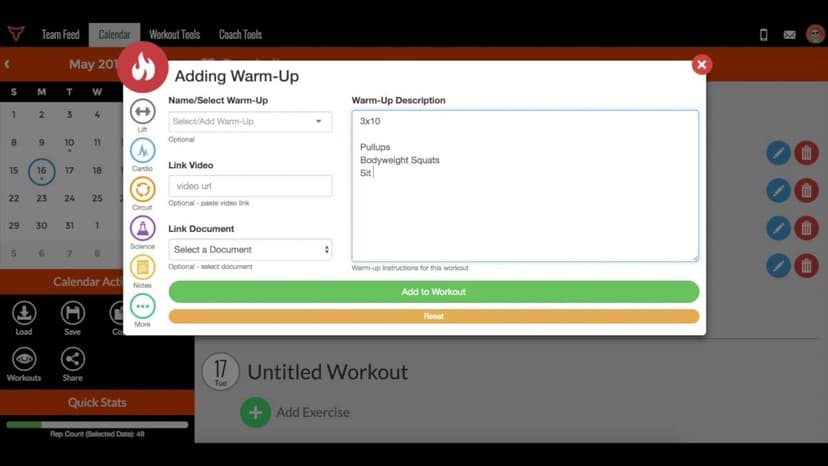
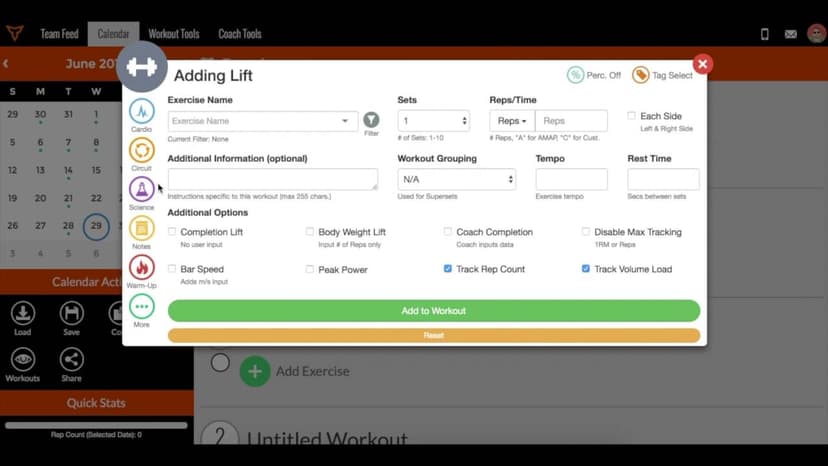
In this video we'll be covering how you can add notes and warm-ups to your exercise program. After selecting a calendar from the drop-down and a workout for the day, you can select the dumbbell icon on the left-hand side. Here you'll see the different exercise categories. We can scroll down and from here if we have a pre-made warm-up or note, we can select that category and then any of these warm-ups that I've already created in my database, I can select that and then I can add that to my workout by dragging and drop that to the top of the workout.
If I want to edit anything from there, I can click into that exercise. I can click the edit button and then if I want to change the amount of reps or any of these movements, I can edit that from here and then save that item. If I want to create a warm-up from scratch, I can select create new exercise. I can name the warm-up. I can call this foam rolling. I can change the type if needed and then I can link an instructional video if I want to cover how to do the different types of movements or I can upload a video straight from my database.
Still stuck? Contact support →
Read next
Also in Platform & Admin
Walkthrough
FreeHow to Add Notes and Warm Ups in the Calendar
A short video walkthrough of how to Add Notes and Warm Ups in the Calendar from the TeamBuildr knowledge base.
Walkthrough
FreeAnnual Planner: Notes
A short video walkthrough of annual Planner: Notes from the TeamBuildr knowledge base.
Walkthrough
FreeHow to Edit and/or Delete Saved Components (Workouts, Exercises, Notes, Questionnaires, etc.)
A short video walkthrough of how to Edit and/or Delete Saved Components (Workouts, Exercises, Notes, Questionnaires, etc.) from the TeamBuildr knowledge base.

Spreadsheet · 2 walkthroughs
Free · sign upAdvanced Attendance Report
Attendance tracking for PE and weights classes that goes past a headcount. Copy the template and it totals participation per student over any window, ready to drop into a grade or a report to an administrator.

Spreadsheet · 2 walkthroughs
Free · sign upAthlete Wellness & Body Report
Track daily wellness check-ins and body composition in one sheet. Copy the template and follow the walkthrough to connect your athlete responses, then use the report to spot who is trending the wrong way before it costs you a session.

Spreadsheet · 7 walkthroughs
Free · sign upCustom Grading System
A ready-made grading spreadsheet for PE and weights classes. Copy the template, connect it to your TeamBuildr data, and it calculates an overall grade from attendance, workout completion and evaluations. Seven short videos walk you through every step of the setup.
- Format
- Walkthrough
- Brand

- Category
- BUILD
- Topics
- Platform & Admin